One Purchase Code for Staging and Live Websites
You can use the same 1-Site Item Purchase Code for registering both live and staging websites. It’s just necessary to prepare the domain of your development website according to the following scenarios.
Direct purchases via Freemius
Freemius won’t count the following staging and development environments:
- *.dev
- *.dev.cc (DesktopServer)
- *.test
- *.local
- *.staging
- *.example
- *.invalid
- local.*
- dev.*
- test.*
- stage.*
- staging.*
- stagingN.* (SiteGround; N is an unsigned int)
- *.myftpupload.com (GoDaddy)
- *.cloudwaysapps.com (Cloudways)
- *.wpsandbox.pro (WPSandbox)
- *.ngrok.io (tunneling)
- *.mystagingwebsite.com (Pressable)
- *.tempurl.host (WPMU DEV)
- *.wpmudev.host (WPMU DEV)
- *.websitepro-staging.com (Vendasta)
- *.websitepro.hosting (Vendasta)
- *.instawp.co (InstaWP)
- *.instawp.link (InstaWP)
- *.instawp.xyz (InstaWP)
- *.wpengine.com (WP Engine)
- *.wpenginepowered.com (WP Engine)
- dev-*.pantheonsite.io (Pantheon)
- test-*.pantheonsite.io (Pantheon)
- staging-*.kinsta.com (Kinsta)
- staging-*.kinsta.cloud (Kinsta)
- *-dev.10web.site (10Web)
- *-dev.10web.cloud (10Web)
Additionally, if your domain is localhost (with any port), it will also be treated as a localhost domain.
Talking about multisite WP, the 1-Site license works on multisite installations arranged as subfolders (like our demo the7.io), and if these sub-websites are logical parts of a single whole. In this case, the main website must be registered with the license first. If these are independent websites or if they are arranged as subdomains, it is necessary to use The7 Unlimited plan. In general, a 1-Site license does not work on subdomains, unless it is a staging subdomain listed above. If you still experience any issues, please submit a support ticket.
Envato users
- The dev site has to be stored within a subdomain or a subfolder of the live site main domain,
eg mysite.com and dev.mysite.com or mysite.com/dev/. - If the staging domain extension is
.test, eg: mysite.com and mysite.test. - For localhost and 127.0.0.1, eg mysite.com and in localhost or 127.0.0.1.
- If the staging site domain has ‘staging-‘ or ‘staging.‘ word in it. For example, ‘staging-blog. domain.com‘.
- If the staging site uses WP Engine temporary domains: “.wp-engine.com“, “.wpenginepowered.com” or “.wpengine.com“.
Alternatively, if you have 3 or more purchases, you can also whitelist your dev domain under my.the7.io:
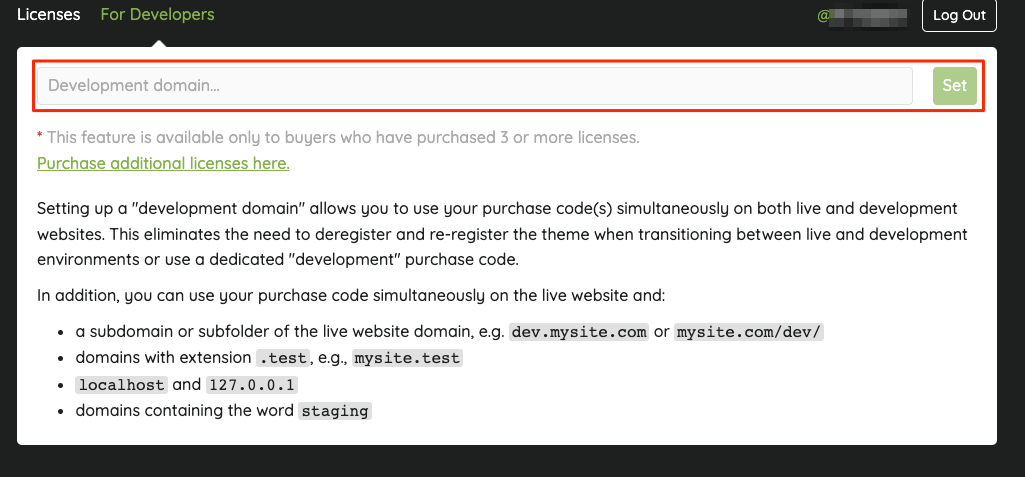
Fig. 1. Adding development domain.