Dream-Theme Support Portal

Forgot password? Register

  • Dashboard
  • Troubleshooter
  • Knowledgebase
  • Customisation

Google Tag Manager

Posted in Elementor, FSE, WPB.

You can use the following script in order to integrate Google Tag Manager into a site: https://gist.github.com/bigdigital/c7fe0256a4a066a6c9bc69b0a0330dfa ,
where ‘GTM-XXXX’ is Google ID.
Or use Dt Res Inc Master plugin
Install it, activate, then follow to Tools -> Dt Res Inc Master and place script to header and after body fields
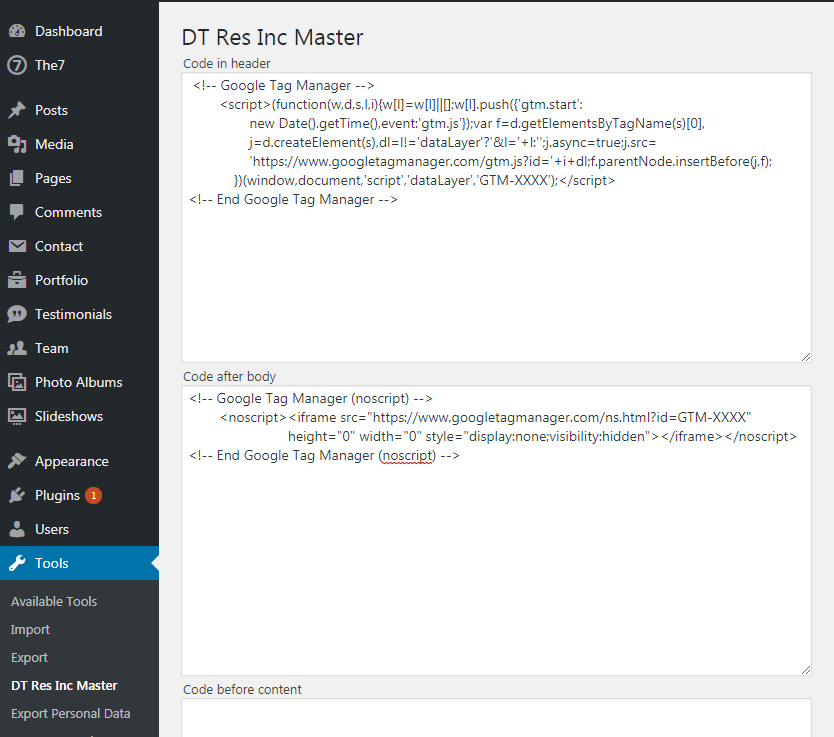
fiig.1 “DT Res Inc Master” plugin interface

9 1

Useful Tips

  • One Purchase Code for Staging and Live
  • How to edit Elementor header, footer, posts
  • How to make the theme load faster
  • “Allowed memory size” Error
  • Already Registered
  • View more

© 2026 Dream-Theme. All Rights Reserved.

Designed by Woo Themes